Personas and Journeys in the age of AI
Like many industries, Service Design is having to rapidly evolve in the face of AI, both in the type of work that we do, and how we can use…
Personas and Journeys in the age of AI
Like many industries, Service Design is having to rapidly evolve in the face of AI, both in the type of work that we do, and how we can use these tools to do better design work.
Every day I see more articles popping up about the application of AI and what it can mean for design. I recently came across a library of “AI prompts for Service Designers”, and one of them really jumped out at me. A prompt for creating a Customer Journey:
I'm creating a journey map for [USER TYPE] using [SERVICE/PRODUCT DESCRIPTION]. The journey starts when [START POINT] and ends when [END POINT].

Create a journey map structure with:
1. Appropriate journey stages (typically 5-8)
2. What to explore at each stage (actions, thoughts, emotions, pain points, touchpoints)
3. Questions I should ask users at each stage
4. What data/evidence I should gather for each stage
If I’m being honest, the idea of using this almost makes me want to scream. I struggle to imagine creating a journey based on that prompt and happily collaborating with a team or going into a workshop. How are any of us going to have a productive conversation?
You need to understand what you’re presenting to answer any questions. Why are people behaving in the way they are? Why are the steps in that order? What tools are people using and why? Where are people struggling? Who is going through this Journey?
Reading this also reminded me that we’re all just exploring this space, and there’s bound to be some frustrations along the way.
With that in mind, I wanted to share what I’ve been working on and found useful. This is more involved than just polishing prompts but I think provides a lot more benefits. I am constantly finding new ways to work with AI tools to strengthen my work, and also how I can avoid becoming overly reliant on them. As designers, we know that our best work comes from feedback, so here’s a chance to dig into what I’ve been doing and hopefully make it better.
The pains and limitations
Service Design has become synonymous with Customer Journey Maps and Personas, they’re almost always a main deliverable for a Service Design project. They’re incredibly useful for articulating intangible experiences and building empathy with the people we interact with as an organisation, but they’re far from perfect.
They can be a time sink
Like Product Designers, Service Designers can spend a significant amount of time in tools like Figma. Making sure the layouts and visuals are right for a workshop, going through feedback and iterations, updating the document all over again. The time that service designers must spend staring at Figma or Powerpoint creating these documents can be significant.
It makes sense for Product Designers to spend so much time in Figma, because they’re designing the actual product in it, and with the rise of AI based tools they’re increasingly designing and building the actual product in that tool.
But Personas and Journeys aren’t the actual service. Journeys and Personas are just tools for communicating parts of a service or abstractions of the users. Each document is just one lens for viewing the service, and the more time it takes up doing one, the less time there is to create the whole picture.
Software tooling
Tooling is a challenge in Service Design. We have some specific needs, but it’s not mainstream enough to have well established tools that are adopted by big companies.
Powerpoint, Excel, Figma. These become our main fallbacks because they are the tools our stakeholders use. We can bend them to work for us, even if they’re not perfect.
Linking back to the time spent on these documents, these tools don’t make it easy. Doing updates to journeys with 25+ steps, with multiple swimlanes, in Figma or Powerpoint is not a small job. Now imagine you’ve got 5+ different journeys to get done. And then a stakeholder asks you if you can put your carefully designed journey into Powerpoint. Actually, I’m sure most of you don’t have to imagine this pain, we’ve all been there.
Sure, there are tools like Smaply, TheyDo and UXPressia which are designed for service designers, but it’s pretty rare for anyone outside of a design team to be interested in learning these new tools just so they can engage with service designers, so you export things as a PDF at the end anyway.
Scaling and inconsistency
If you’re starting a new project and you ask around for any existing personas or journeys, be prepared to get them in at least 3 different styles or formats. Different fields, different swimlanes, different levels of detail…urgh.
This may be less of a problem in small organisations but, over time different teams will take on service design related work and they’ll each develop their own way of sharing that work. This makes it incredibly difficult to share learnings or build on each others’ work.
It also makes it almost impossible to manage these at scale. A head of experience, head of Design or Chief Design Officer has no easy way of knowing what exists, how complete they are, how evidence based they are.
Lack of Machine/AI readability
As I mentioned earlier, most of our Personas and Journeys end up in PDFs. It’s a nice, universal format that we can send people to read and print. It removes the pain of asking someone to use a specialist tool. It also prevents people making random changes to a document without us knowing.
But from a machine readability perspective, it’s a mess. From a compatibility perspective, it’s so difficult to import a PDF into Figma, Miro Excel or anything useful.
Looking beyond that, putting a PDF journey into an AI tool is at best just energy intensive as it tries to understand the document. Quite possibly it won’t fully understand what it’s looking at, it won’t extract all the information, and each time you do it it might notice slightly different information.
It’s the opposite of “AI Ready”, as many people like to say.
I’ve been exploring how we can take a new approach to these proven tools that fits with the world we’re in today and hopefully solve some of the problems above.
Standardising my tools
This all began from a pain I think we’ve all faced, you have some insights or documents and you need to get it into the tool you’re using, in my case it was Figma.
We had research insights that were captured in Excel, then put into powerpoint for presentations, and then into Figma to go into Persona templates. I don’t need to tell you how frustratingly time consuming it is to manually do all of that. It was 2025, that shouldn’t be the case.
I set about looking at how we could import information directly from Excel into a Figma template. It kind of worked, formatting was a bit janky but it was a first step.
Doing this I came to think about Personas and Journeys less as documents to be created, but they’re sets of data. If you have that data stored in a standardised format, it can be more easily imported, compared, analysed and managed.
I’ve been working on developing a standard for capturing Personas and Journeys as data, which can be more easily managed, imported into various tools and become machine readable.
Standards
Standards: something used as a measure, norm, or model in comparative evaluations.
Standards often aren’t the most exciting of topics, but they make it easier for teams and systems to work together across all industries.
When I talk about “Standards” in this context, I mean agreeing on a basis for what good looks like for personas and Journeys. As we know, they can be done in different ways, but there are universal standards and commonalities across them. For example, whether you’re working in government, banking, healthcare or other industries, Journeys must have phases, user steps, and needs.
Based on my experience and deliverables I’ve produced over the years, I started defining a set of standards that I could use more universally across my work.
Doing this ensured there was always a core set of information captured, and captured in a similar way. This makes sure that I’m being rigorous and not missing information, but also means I can compare between workstreams or projects more easily.
This didn’t stop me from adding additional fields or information if I needed to, but meant I could work within a repeatable, shareable framework.
Personas, roles and Journeys
As I’ve mentioned in a previous post, I no longer use just Personas and Journeys in a lot of my work. Instead I break these down into Personas, Roles and Journeys.
This makes it easier to be clear about the people involved and the role or activities they’re doing at the time. This can be particularly helpful if you have a large number of Personas and Roles that work in combination, otherwise you end up trying to create personas that cover every possible combination.
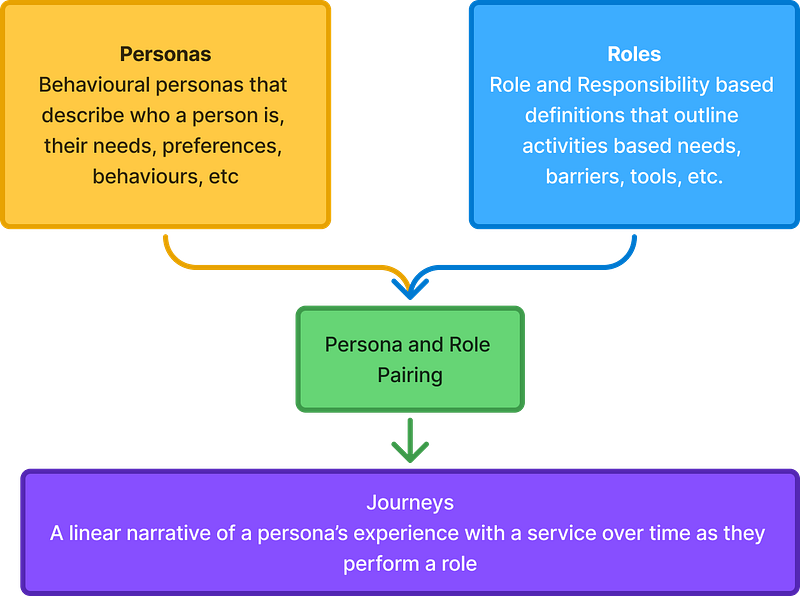
I reviewed examples of these, compared them and picked apart what good looks like for them, and how they work together. This gave me a clear breakdown of what sort of information I needed to capture.
Creating these Standards was only part of the answer though. Using this, I could format my Figma powerpoint, excel and any other tool to have these same fields. It would make it easier to work consistently, and make it easier to copy and paste directly between them, and maybe build integrations.
I could even share them with other people to use and carry on working exactly the same today, just in a slightly more consistent way. Still using different formats, still taking ages in Figma. It’s like giving people a template.
Personas, Roles and Journeys as Data Schemas
As I said earlier, I no longer saw Personas, Role and Journeys as files sitting in a tool, but as data. The next step was turning this into a practical format I could use. This is where the “Schemas” come in.
A data schema is the blueprint or structure that defines how data is organised, stored, and related within a database or data system
If the Standards defined what good looks like, the Schema is how that is structured, stored and formatted. It takes the standards we’ve set and then specifically outlines how data should be captured and formatted to support them.
For example, when you register for a service, you often provide information like your name, username, email, account number etc. For this to actually be useful, this needs to be in a consistent way otherwise it’ll be hard to find or use that information.
The Schema outlines the type of information needed and how it should be formatted, e.g. names must be captured using letters and cannot be left blank, ages are captured as numbers, etc.
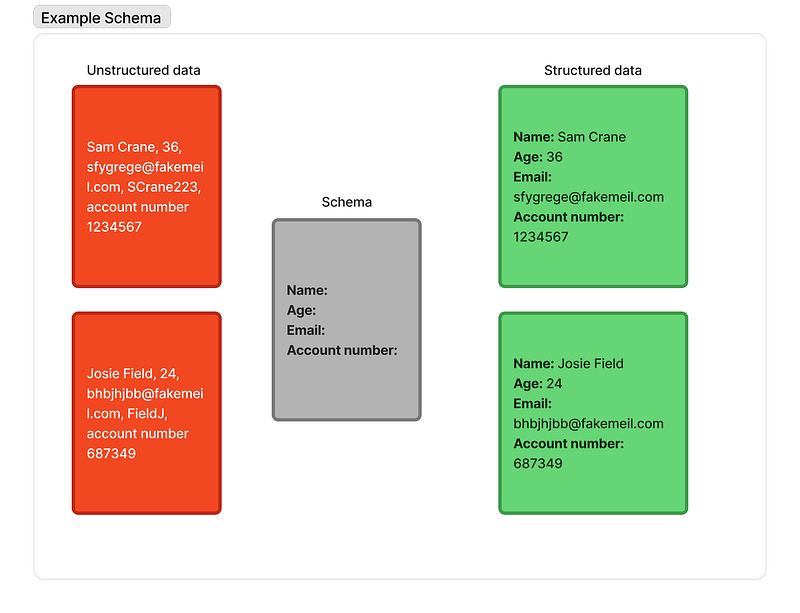
From this example, it becomes fairly easy to see how this can be applied to Personas. We know what information we need and how it should be captured, but rather than locking that information into a design tool this can be stored as a data file that can be analysed, updated or audited directly. We can import into a design tool when needed.
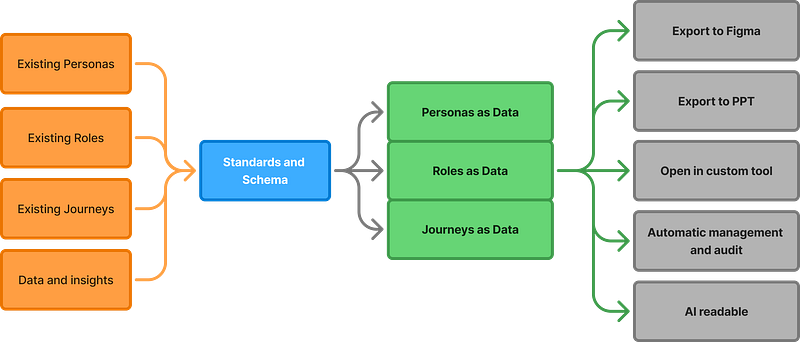
Storing and interacting with data
This data could be stored in a range of different file formats. I’ve been building a Service Design Schema in JSON. This is a well known data format that is supported by a wide range of tools. It can be easily converted to other formats, and is easily readable by AI tools. This should make it easier to support and integrate with other tools in future.
I have a set of Schema templates for Personas, Roles and Journeys, that define how the data should be formatted and structured. Based on these, I have created sets of Personas, Roles and Journeys that follow that format.
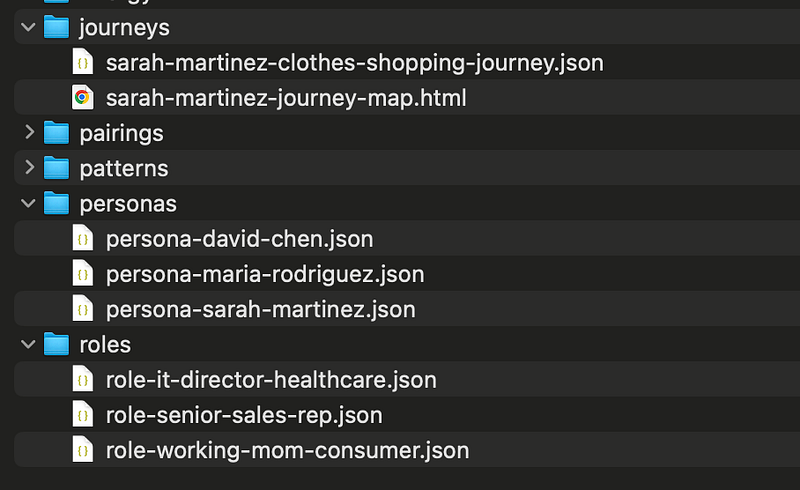
Now, I’m not an expert in JSON, and I wouldn’t expect other Service Designers to suddenly become experts in it either. We’re designers and researchers and not developers for a reason.
JSON is relatively simple and widely supported, making it easy to import it or display it in other tools that make it easier for us to interact with, or use AI to handle the direct interaction on our behalf.
I’m not a software developer, but I’ve built a tool that lets me view and edit Personas and Journeys and then store them as JSON files. I don’t have to manually edit any JSON files.
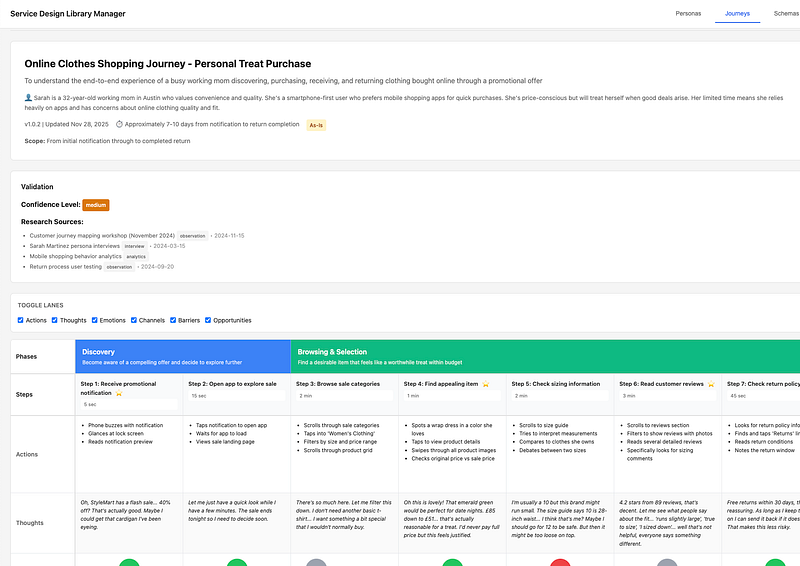
If you look closely at the screenshot of my files above, you’ll see folders for “Pairings” and “Patterns”
When using Personas and Roles together, you treat them as a pair to articulate how a persona performs a particular role, whether it’s as a consumer, an employee or something else. This can lead to emergent pains, needs or insights. This is often discussed in a workshop but can sometimes be forgotten. To capture this, I’ve included Pairings, which reference what Persona and Roles they combine and what the emergent insights are.
“Patterns” is a work in progress, exploring how we can apply this approach to Service or Journey Patterns. I might share more soon.
How I’ve been using this
To introduce this section, I will repeat that my goal here isn’t to just replace service designers with AI, I don’t think that will lead to the best work. I’ve been working out how it can be used to enhance our work and methods to reinforce what we do. I also want to find ways that work without becoming too reliant on it to do my work.
I use Claude and Claude Code as my go-to AI tools so I’ll be using them as a reference.
Core Workflows
**Importing into Figma (Doesn’t use AI at all)
** First things first, yes! This has solved my original painpoint. I have created a Figma plugin that lets me create entire Personas, Roles and Journeys in Figma. I can choose which fields to include and it just does it. Amazing.
I’m currently working on improving this so that I can map the fields to an existing template so that if I’m given existing figma templates to use, or I want to export into separate templates for a summary view and a full view I can do that too.
I’m also looking at plugins for other tools like Mural, PPT, etc.
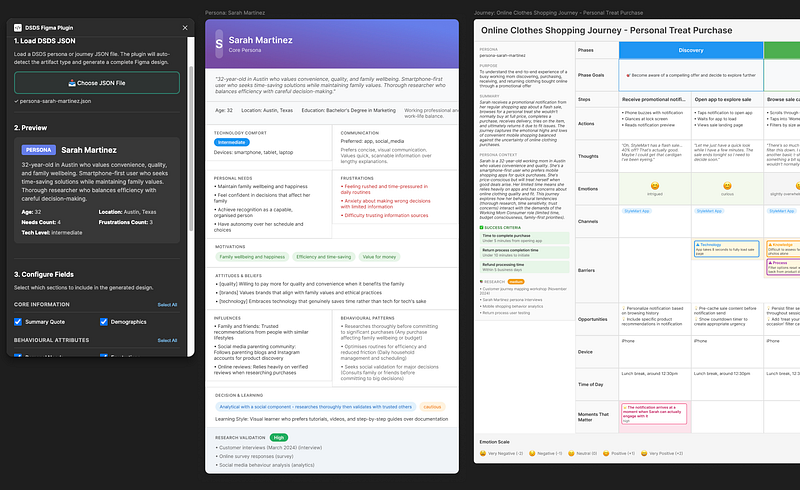
**Importing and re-using documents
** I’ve created a Claude “Skill” (A repeatable task) that handles importing existing Personas, Roles and Journeys, and converts them to JSON. It also checks it against the Schemas and identifies if it is an update to an existing file or if it’s a new one.
This almost entirely removes the pain of being sent documents in different formats. It also means that once something is in the JSON format, we can re-use it each time, which is more energy efficient.
**Back tracking and Role Stacking
** In the schemas, I’ve made sure that there are backward references to what the document is based on.
- The Journey references what Persona or pairing or roles and Personas its based on.
- Pairings reference which Personas and Roles they’re based on.
- They each have fields for capturing what research they’re based on.
This makes it much easier to track updates and changes, and go back to original insights.
It also makes it easier to do “Role Stacking”, where a persona may have more than one role. For example, a consumer might be a buyer of consumer and business services from one company, these can be stacked. In Employee Experience, an employee might have a Role for their main job, and a role as a manager and Learning and Development Lead. Each of these roles can be stacked and that’s captured in the JSON files.
**Flexing to support different projects
** In the standards and Schema, I’ve included optional fields and extensions so that I can include additional information if it’s needed for a specific project without breaking the whole structure.
I also made sure that using Personas and Roles wasn’t a requirement. If it’s just a small project, you can just add additional fields to the Persona and use it as a combined file. They can still integrate with Journeys just fine.
Being able to build Persona or Journeys that fit a specific project company is important, I didn’t want to be limited to a restrictive framework that would get in the way of doing good work in future.
AI-Enhanced Workflows
**Assessing completeness and quality
** With all the Personas, Roles and Journeys following a consistent format, it becomes incredibly easy to assess all my documents for completeness and quality.
I created a script that reviews all the documents, compares them to the schema files and gives me a score for completeness. Rather than reviewing every single document by hand, I can get an answer for all documents in under 10 seconds.
I’ve created a Skill in Claude which can use this script as a tool to review all the documents for completeness, and it identifies where there are gaps and what is needed to improve the quality of the file.
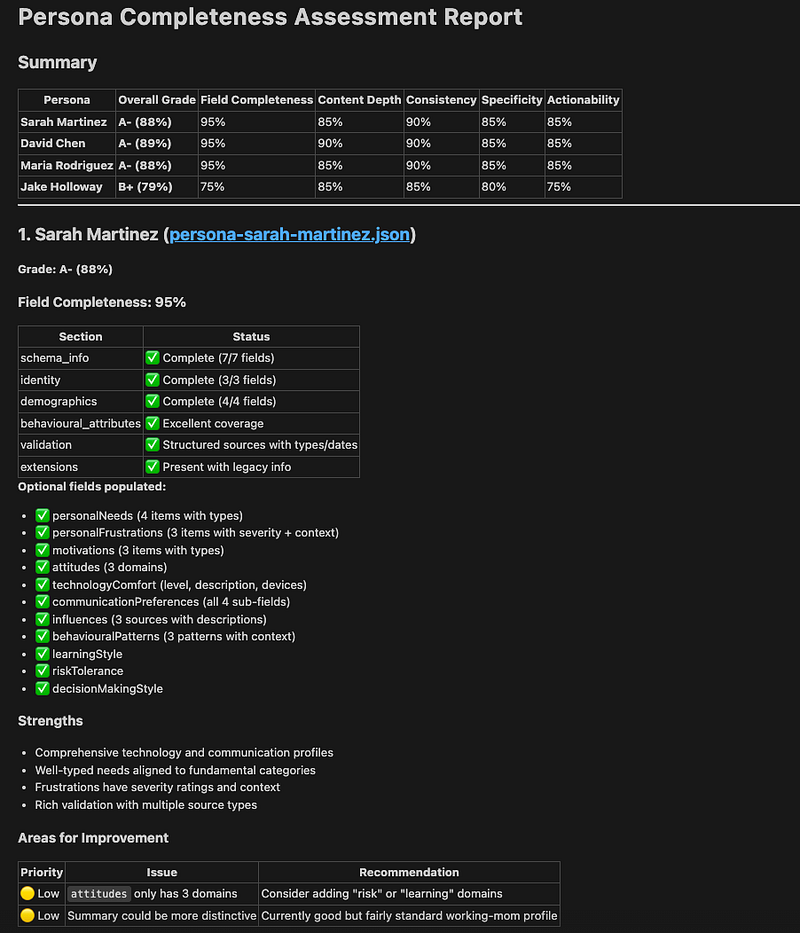
Occasionally, I’ll improve and update the schema templates for Personas, Roles or Journeys, I’m now on V1.1 When that happens, it can reference the updated version and then flag if there are any issues with existing documents.
**Barrier identification
** I’ve created a Skill that aggregates and analyses barriers across multiple journeys, personas, etc, to identify patterns and systemic issues. When working with a large volume of documents, this would take ages by hand.
This gives me a summary of identified barriers, an analysis of any patterns, any systemic issues it has identified and some prioritised recommendations. This can be really useful for seeing if we’ve missed something, or seeing how widespread a problem is.
**Visualising materials
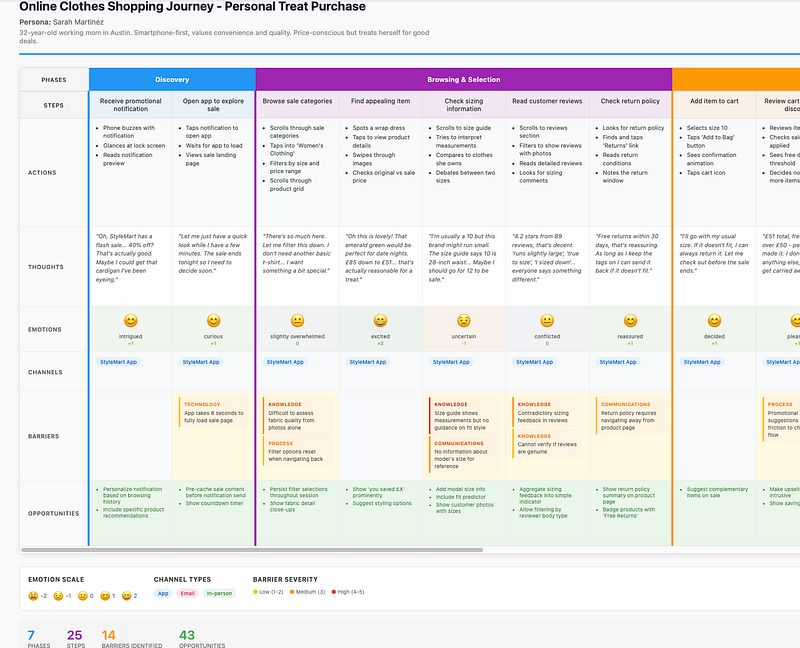
** Interacting with Journeys through an AI chat interface isn’t always the easiest. Conversation AI can be great, but sometimes you need to see something mapped out.
I’ve created a Skill that quickly visualises documents in HTML so that I can easily review them, without needing to import it into a tool like Figma.
**Sounding board
** Because Claude has access to a well structured knowledge base, it makes it much easier for Claude to be a sounding board for challenging my thinking and assessing gaps I’ve missed.
When a project is running at full speed, it can be easy for something to fall off the radar. This makes it easier to have a second check and test thinking. We can easily add additional Personas, Roles and Journeys and add to the knowledge base as the project progresses.
What next?
I built this as a side project, born out of frustration and wanting to make it easier to work with Journeys and Personas. But it’s just a starting point and a proposal for what we could build.
On my backlog, I have a few things I want to explore more:
- Making Personas deeper and richer with insights and more data led
- As-is vs to-be Journeys
- A tool for managing schemas and how they can be tailored for a specific organisation or team, without losing the core standards.
- Service Patterns
- Some guidance and documentation that’s easier to read…
Get involved
The best design work isn’t done in isolation, it’s done through collaboration, feedback and iteration. I have my own thoughts on what good looks like and what might be helpful but I want to hear from others about what works, what doesn’t work and how we could make this something we could all use.
I think this could be something genuinely helpful for a lot of teams, but it’s not something I should just do in isolation.
I’ve put my work so far on Github, so that everyone can have a look at what I’ve been working on, experiment with it, give feedback and more. Because I want this to be an open standard, you could build your own tools entirely or build it into tools you’re already working on.